ROBCO INDUSTRIES UNIFIED OPERATING SYSTEM

COPYRIGHT 2075–2077 ROBCO INDUSTRIES

TERMLINK PROTOCOL ............ READY

MEMORY MAP ................... OK

APP DIRECTORY ................ MOUNTED

HANDING CONTROL TO OPERATOR_

ROBCO INDUSTRIES (TM)INSTALLER / PIP-BOY 300000:00:00
← Return to model directory
TARGET LOCKED: Pip-Boy 3000APPS/ + APPINFO/ · Do not use on the other Pip-Boy model.
APP PACKAGE / ROBCO-CALCULATOR

RobCo Engineering_

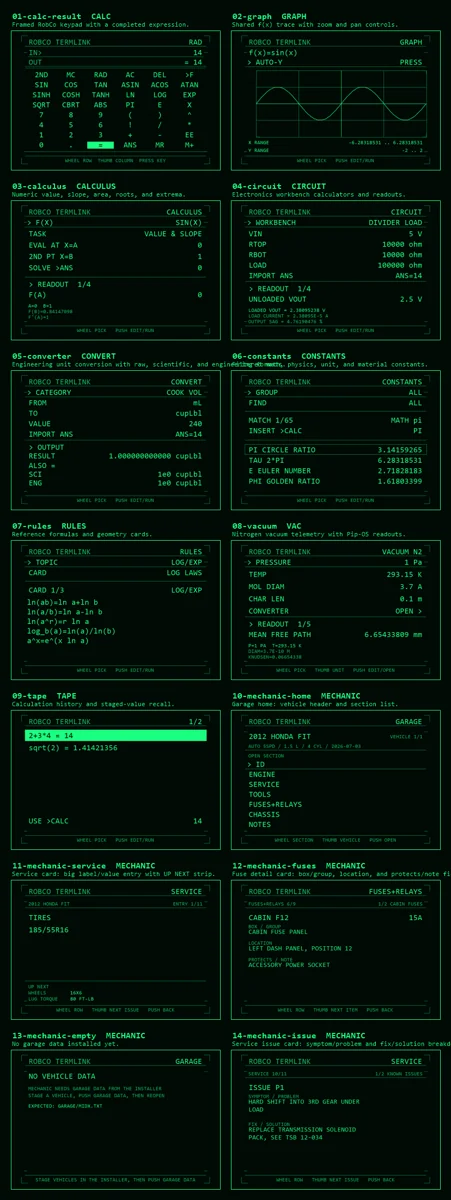
Ten independent engineering tools for scientific math, graphing, calculus, electronics, conversion, reference, vacuum work, history, and vehicle service.

Pip-Boy 3000Version 3.65Native 3000 suite · ten apps
Contact sheet of the RobCo Engineering applications
01 / PRECHECK

Compatibility + prerequisites

DEVICE COMPATIBILITY

  • Pip-Boy 3000
  • APPS/ and APPINFO/ launcher layout
  • Chrome or Edge for direct microSD and USB serial installation

BEFORE PROCEEDING

  • Back up the entire Pip-Boy microSD card before changing files.
  • Use a data-capable USB cable or mount the microSD card directly.
  • Do not install this package on a Pip-Boy 3000 Mk V; the app contracts are different.
02 / PROCEDURE

Install package

INSTALLER NOTES

  • Use the browser installer below for direct card, USB serial, or ZIP installation.
  • The installer writes application files only. It does not flash or replace device firmware.
  • If direct removable-media access fails, download the ZIP and extract it to the microSD root.

Back up the card

Copy the complete microSD card to a safe location before installing or updating an app.

Launch the correct installer

Open the hosted Pip-Boy 3000 installer in Chrome or Edge and confirm the model shown at the top.

Choose one target

Select the mounted microSD root or connect the Pip-Boy over USB serial. Close other serial tools first.

Install the payload

Install directly, or download the generated ZIP and extract it to the microSD root while preserving its folders.

Reboot and verify

Safely disconnect, reboot the Pip-Boy 3000, and complete the checks below.

03 / VERIFY

Confirm the install

  1. Every selected app appears as its own tile.
  2. Calc opens without memory or callback errors.
  3. Graph and Calculus can read a function published by Calc.
04 / RECOVERY

Troubleshooting

A selected tile is missing.

Confirm its APPS JavaScript and both matching APPINFO files were copied, then reboot.

Direct card installation fails.

Use Download .zip and extract the result to the microSD root.

UNINSTALL / ROLLBACK

  • Remove selected APPS/P*.JS files and matching APPINFO manifests and icons.
  • Keep CALCST and GARAGE data unless you intend to erase shared state.
  • Restart the launcher.
05 / RECORD

Package features

[01]

Ten individually selectable launcher apps

[02]

Shared functions, Ans, memory, angle mode, and history

[03]

Mounted-card, USB serial, and ZIP installation

[04]

Optional Mechanic garage data