ROBCO INDUSTRIES UNIFIED OPERATING SYSTEM

COPYRIGHT 2075–2077 ROBCO INDUSTRIES

TERMLINK PROTOCOL ............ READY

MEMORY MAP ................... OK

APP DIRECTORY ................ MOUNTED

HANDING CONTROL TO OPERATOR_

ROBCO INDUSTRIES (TM)INSTALLER / PIP-BOY 3000 MK V00:00:00
← Return to model directory
TARGET LOCKED: Pip-Boy 3000 Mk VUSER/ + APPINFO JSON · Do not use on the other Pip-Boy model.
APP PACKAGE / ROBCO-ENGINEERING-SUITE-MKV

RobCo Engineering Mk V_

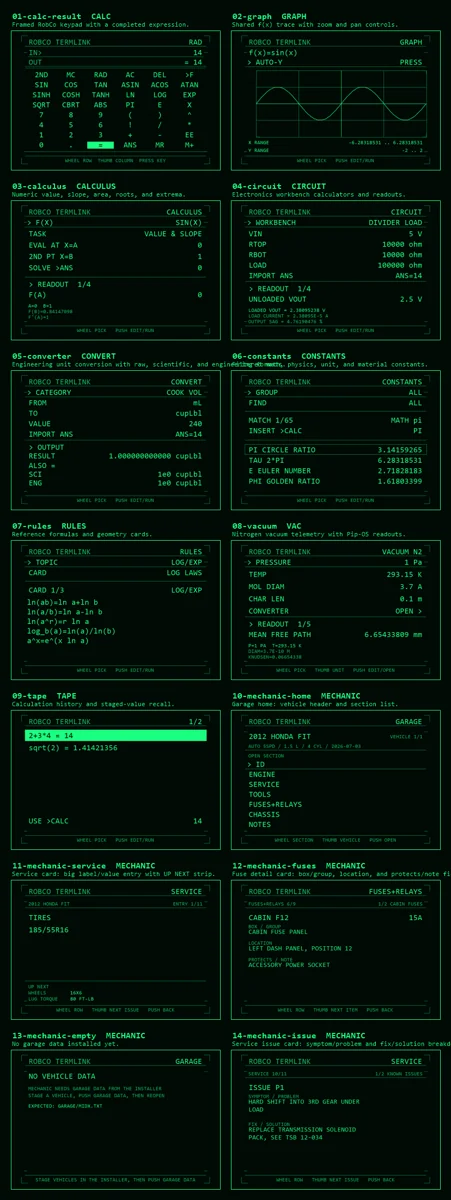
The complete ten-app engineering suite ported to the Mk V USER/ and APPINFO JSON application model.

Pip-Boy 3000 Mk VVersion 4.0.2Mk V port · ten apps
Contact sheet of the ten RobCo Engineering tools
01 / PRECHECK

Compatibility + prerequisites

DEVICE COMPATIBILITY

  • Pip-Boy 3000 Mk V
  • USER/ apps with APPINFO JSON registration
  • Chrome or Edge for direct microSD and USB serial installation

BEFORE PROCEEDING

  • Back up the entire Pip-Boy microSD card before changing files.
  • Use a data-capable USB cable or mount the microSD card directly.
  • Do not install this package on a non-MkV Pip-Boy 3000; the app contracts are different.
02 / PROCEDURE

Install package

INSTALLER NOTES

  • Use the browser installer below for direct card, USB serial, or ZIP installation.
  • The installer writes application files only. It does not flash or replace device firmware.
  • If direct removable-media access fails, download the ZIP and extract it to the microSD root.

Back up the card

Copy the complete microSD card to a safe location before installing or updating an app.

Launch the correct installer

Open the hosted Pip-Boy 3000 Mk V installer in Chrome or Edge and confirm the model shown at the top.

Choose one target

Select the mounted microSD root or connect the Pip-Boy over USB serial. Close other serial tools first.

Install the payload

Install directly, or download the generated ZIP and extract it to the microSD root while preserving its folders.

Reboot and verify

Safely disconnect, reboot the Pip-Boy 3000 Mk V, and complete the checks below.

03 / VERIFY

Confirm the install

  1. Every selected app appears under INV > APPS.
  2. Calc opens without hanging on the launch screen.
  3. Graph and Calculus read the function published by Calc.
04 / RECOVERY

Troubleshooting

An app hangs at launch.

Reinstall the current Mk V USER build; do not substitute the non-MkV APPS version.

A selected app is missing.

Confirm both its USER JavaScript and APPINFO JSON record were written, then reboot.

UNINSTALL / ROLLBACK

  • Remove selected USER/PIP*.js files and APPINFO JSON records.
  • Preserve shared CALCST and GARAGE data unless intentionally resetting it.
  • Reboot the Mk V.
05 / RECORD

Package features

[01]

Ten firmware-native Mk V apps

[02]

Per-app selection and non-destructive partial updates

[03]

Shared math state and optional garage records

[04]

Mounted-card, USB serial, local-source, and ZIP workflows